
Join the Science Service for Biodiversity and be part of the solution for nature.
Membership is free and open to everyone.
- Start by joining the Biodiversity Knowledge Agora, an open community where you will be kept up to date with the latest developments and where you can interact with others.
- In 2026 will be introducing a registration process for experts wishing to contribute to the Science Service for Biodiversity’s policy request process. Join the Agora and you’ll be among the first to receive information on how to apply for expert membership as soon as registration opens.
Benefits of joining
- Access to cutting-edge knowledge: Gain insights from international researchers and experts.
- Policy-relevance: Engage with and contribute to informing policy processes.
- Networking: Connect and join discussions with experts and stakeholders.
- Recognition: Receive credit for your contributions.
- Advocacy: Amplify important issues and influence positive change.
- Professional growth: Develop and share skills.
Membership of the Science Service for Biodiversity is managed by Oppla, the EU Repository of Nature-based Solutions. Oppla is the data controller responsible for any personal information you share in compliance with the General Data Protection Regulation (GDPR).
If you have an existing Oppla user account, you can join the Biodiversity Knowledge Agora right away. If you don’t have an Oppla account, it’s easy create one. Here's how to join and be part of the community.
Joining instructions
Before you join a KEN within BioAgora, you need to join Oppla – the platform hosting the Science Service for Biodiversity. If you already have an Oppla account you can log in using your existing username and password.
Joining Oppla
- Complete the short form and you'll receive an email to activate your account
- Click the link in the email to set your password (check 'spam/junk' if the email does not arrive immediately). If you have any issues please email support@scienceserviceforbiodiversity.eu
- On the next screen, you will see your profile. Select 'Upgrade to verified user'
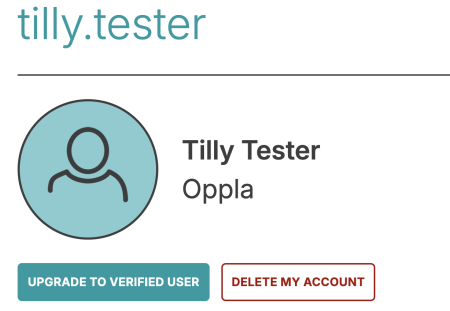
- Fill in the additional information and press the “Upgrade your account” button to verify you account. You can now join communities on Oppla.
How to Join a KEN
- Find the community you want to join by going to the Community page
- Select the KEN you want to join.
- Press the “ Request to join” button on the right hand side of the screen
⚠️ If your request is not approved within two working days, please email support@scienceserviceforbiodiversity.eu
- When your membership is approved you will get an email. You will then find the KEN on your profile page when you log in so you can easily share biodiversity knowledge.